
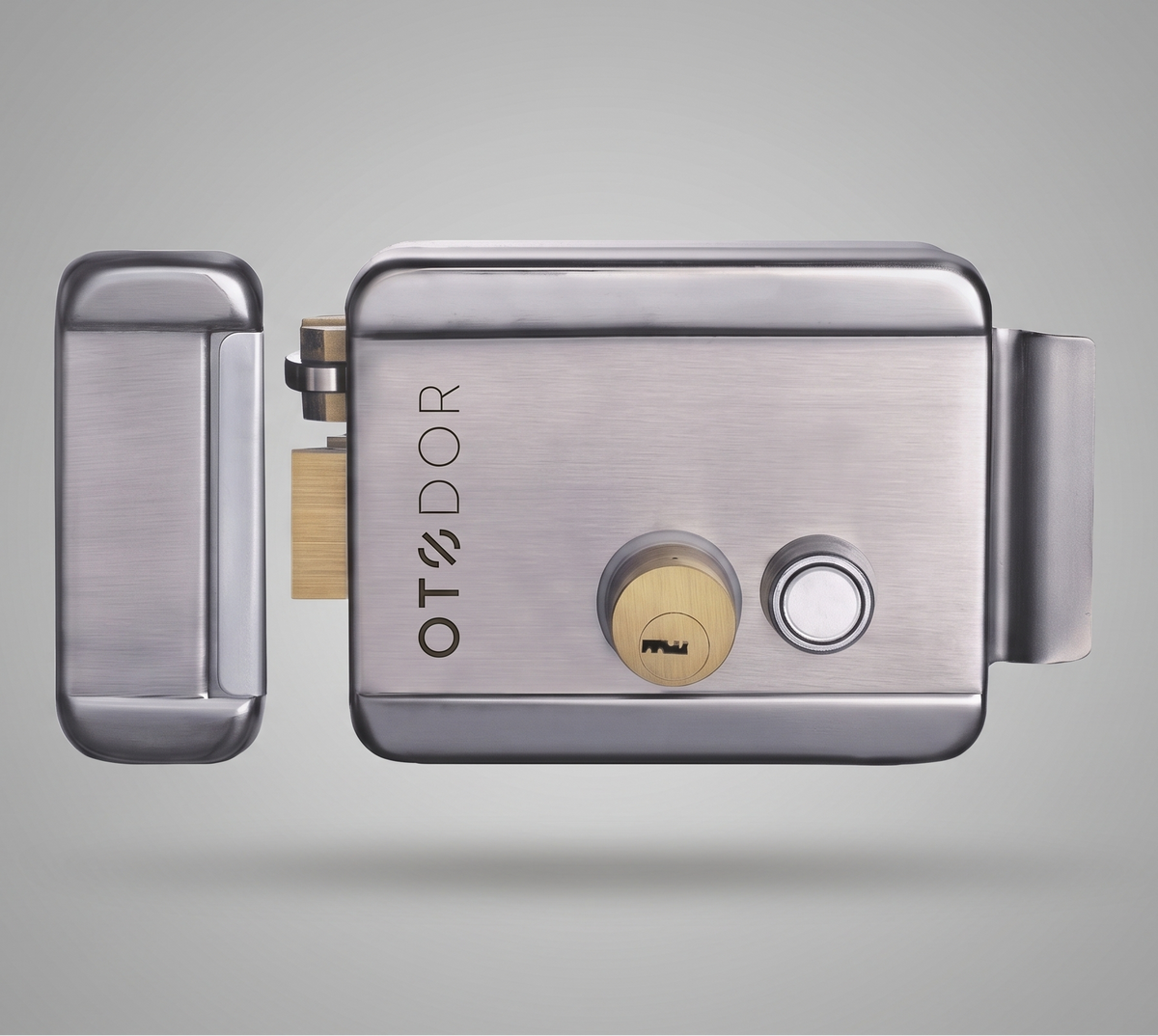
[ Electric Rim Lock ]
CENTRIO
Your gate. Opened from anywhere.
From ₹1,900 · 2-year warranty

[ Build your kit ]
CENTRIO for your gate.
1. Choose your kit
All kits include 8 keys2. Installation
Professional installation (₹2,500) by our technician & welder is available only in Delhi NCR (Delhi, Gurugram, Noida, Faridabad, Ghaziabad), Tricity (Chandigarh, Mohali, Panchkula) and Bengaluru. Everywhere else, we ship the kit with the installation guide below.
In the box
Inclusive of all taxes · Free delivery across India · Secure payment via Razorpay — UPI, cards, net banking.
Need help choosing? Call or WhatsApp +91 72068 95607
[ Why CENTRIO ]
Built for the gate.
Not the drawing room.
An electric rim lock made for boundary gates, wicket gates and metal doors — out in the sun and the rain, every single day.
[ Compare kits ]
Which CENTRIO is right for you?
| Rim Lock | Remote Kit | Smart Wi-Fi Kit | |
|---|---|---|---|
| CENTRIO lock + 8 keys | ✓ | ✓ | ✓ |
| Open with key | ✓ | ✓ | ✓ |
| Open from video door phone / wired switch | ✓ | ✓ | ✓ |
| Controller with power supply | — | ✓ | ✓ |
| Remotes included | — | 3 | 3 |
| Expandable up to 20 remotes | — | ✓ | ✓ |
| Access panel compatible | — | ✓ | ✓ |
| Smart Life app — open from anywhere | — | — | ✓ |
| Alexa & Google Home | — | — | ✓ |
| Share access & schedules | — | — | ✓ |
| Warranty | 2 years | 2 years | 2 years |
[ Smart Wi-Fi Kit ]
The gate, in your pocket.
The Wi-Fi kit connects CENTRIO to the free Smart Life app on Android and iPhone. Someone at the gate while you're at office? Open it from there.
Open from anywhere
One tap unlocks the gate over home Wi-Fi or mobile data.
Share with family
Add family members to your home so everyone gets the button on their own phone.
Voice control
Link Smart Life to Amazon Alexa or Google Home and open the gate by voice.
Schedules & scenes
Timers and automations — for example, release the gate when you tap "Arriving home".
Activity record
See when the gate was opened from the app in the device history.
Remotes still work
App, remotes, VDP and the key all work side by side. No internet? Use the remote.
[ Wiring diagram ]
Two wires to the gate.
That's it.
The controller sits indoors next to a switchboard. A single 2-core cable runs from it to the lock on the gate. Remotes, the app and your video door phone all talk to the controller.
Always switch off mains before wiring. Terminal markings follow the label printed on your controller. If in doubt, call us before powering on.
[ Installation guide ]
How to install CENTRIO
on your gate.
Open the full setup manual: wiring, remotes, Smart Life app and troubleshooting ↓
A local welder or electrician can fit CENTRIO in about 2–3 hours. Here's exactly how — or book our team in Delhi NCR, Tricity or Bengaluru.
Pick the spot
Fit the lock on the inside face of the opening leaf, at the closing edge, about 1 m (3–3.5 ft) from the ground. The latch should meet the fixed leaf, the pillar or a steel post squarely when the gate is shut.
Make a mounting plate
On grille, jaali or slatted gates, weld a flat MS plate (approx. 3–5 mm) to the gate frame so the lock body sits flat. Drill holes to match the lock body and grind the welds smooth.
Fix the lock body
Bolt CENTRIO to the plate with the key cylinder facing outward. Check the key turns freely and the latch moves in and out without rubbing.
Align the keeper
Close the gate and mark where the latch lands. Weld or bolt the keeper (strike) on the fixed leaf or pillar so the latch drops fully into it. Test by slamming the gate gently — it should lock every time.
Mount the controller
Remote / Wi-Fi kit: fix the controller indoors or under a roof, near a switchboard and within Wi-Fi range. Keep it out of direct rain and sun.
Run the cable
Lay the 2-core cable in PVC conduit from the controller to the gate pillar. Cross from the pillar to the moving leaf on the hinge side through a flexible conduit loop, so the wire bends — not breaks — every time the gate swings.
Connect & seal
Connect the two wires to the lock terminals and the controller's lock output, mains to the power input, and the push switch or VDP if used. Tape, sleeve and seal all outdoor joints against water.
Pair & test
Power on. Test each remote, then add the controller to the Smart Life app (Wi-Fi kit). Finally test with the key. Open and close 10 times — every unlock should be crisp.
Tools you'll need
- Welding machine & grinder
- Drill with metal bits
- Spanner / screwdriver set
- Tester & insulation tape
Materials (not in box)
- 2-core copper cable — length as per site
- PVC conduit + flexible conduit for the hinge
- MS plate for grille gates
- Cable ties, clamps & sealant
[ Specifications ]
Tech specs.
- Type
- Electric rim lock for metal gates
- Body
- Stainless steel, weatherproof
- Cylinder
- Brass
- Keys
- 8 keys included
- Suitable for
- Boundary gates, wicket gates, MS / steel doors — homes, factories, offices, shops
- Unlock methods
- Key · Remote · Video door phone · Wired push switch · Access panel · Smart Life app · Alexa · Google Home
- Remotes
- 3 included with Remote and Wi-Fi kits · up to 20 supported
- Wireless
- RF remotes · 2.4 GHz Wi-Fi (Wi-Fi kit)
- App
- Smart Life — Android & iOS
- Warranty
- 2 years product warranty
[ Warranty ]
Covered for two years.
Clearly.
What's covered
- Manufacturing defects in the lock, controller and remotes
- Valid from the date of delivery, with your order number
- Repair or replacement at OTODOR's decision
What voids the warranty
- Coil damage — including a burnt coil from wrong voltage or continuous power
- Physical damage — breakage, dents, forced entry, tampering or opening the lock
- Damage from incorrect wiring, power surges or water entry at joints
[ Questions ]
Good to know.
Will CENTRIO fit my gate?
If your gate is metal (MS, steel, iron grille or slatted) — yes. On grille or jaali gates a small MS plate is welded first so the lock sits flat. Send us a photo on WhatsApp and we'll confirm.
What happens during a power cut?
The gate stays locked. Open it with any of the 8 keys from outside. Remotes and the app work again as soon as power returns.
Can I connect it to my video door phone?
Yes. Most video door phones have a door-release output. Connect it to CENTRIO (rim lock) or to the controller's trigger input (kits), and press the unlock button on your VDP screen.
Do I need internet for the remote?
No. Remotes talk to the controller directly by radio. Internet is only needed to use the Smart Life app from outside your home and for Alexa / Google Home.
Can I add more remotes later?
Yes — up to 20 remotes per controller. WhatsApp us to order extra remotes.
Why aren't coil and physical damage covered?
The coil is damaged by wrong voltage or by being powered continuously, and physical damage comes from impact or force — neither is a manufacturing defect. Use the supplied controller and follow the wiring diagram, and your CENTRIO will last for years.
Everything to fit it, wire it and set it up.
The full CENTRIO manual on one page: the key cylinder, what's in the box, remotes, both lock supplies, step-by-step installation, Smart Life app setup and fixes for common problems.
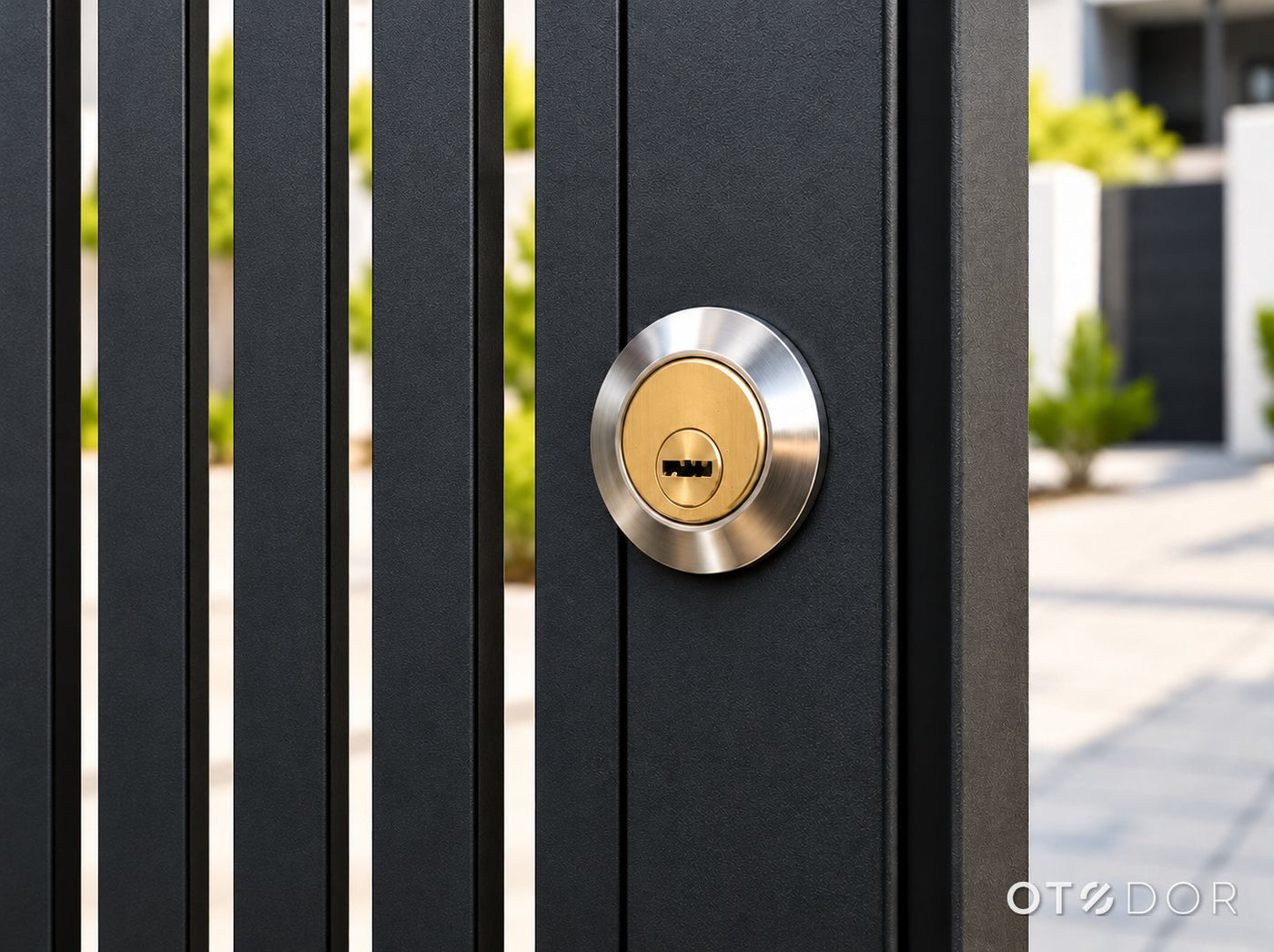
Only the key cylinder shows.
CENTRIO mounts on the inside face of the gate. From the street you see a neat chrome ring and a brass key cylinder, nothing else. The key always opens the gate, even in a power cut.
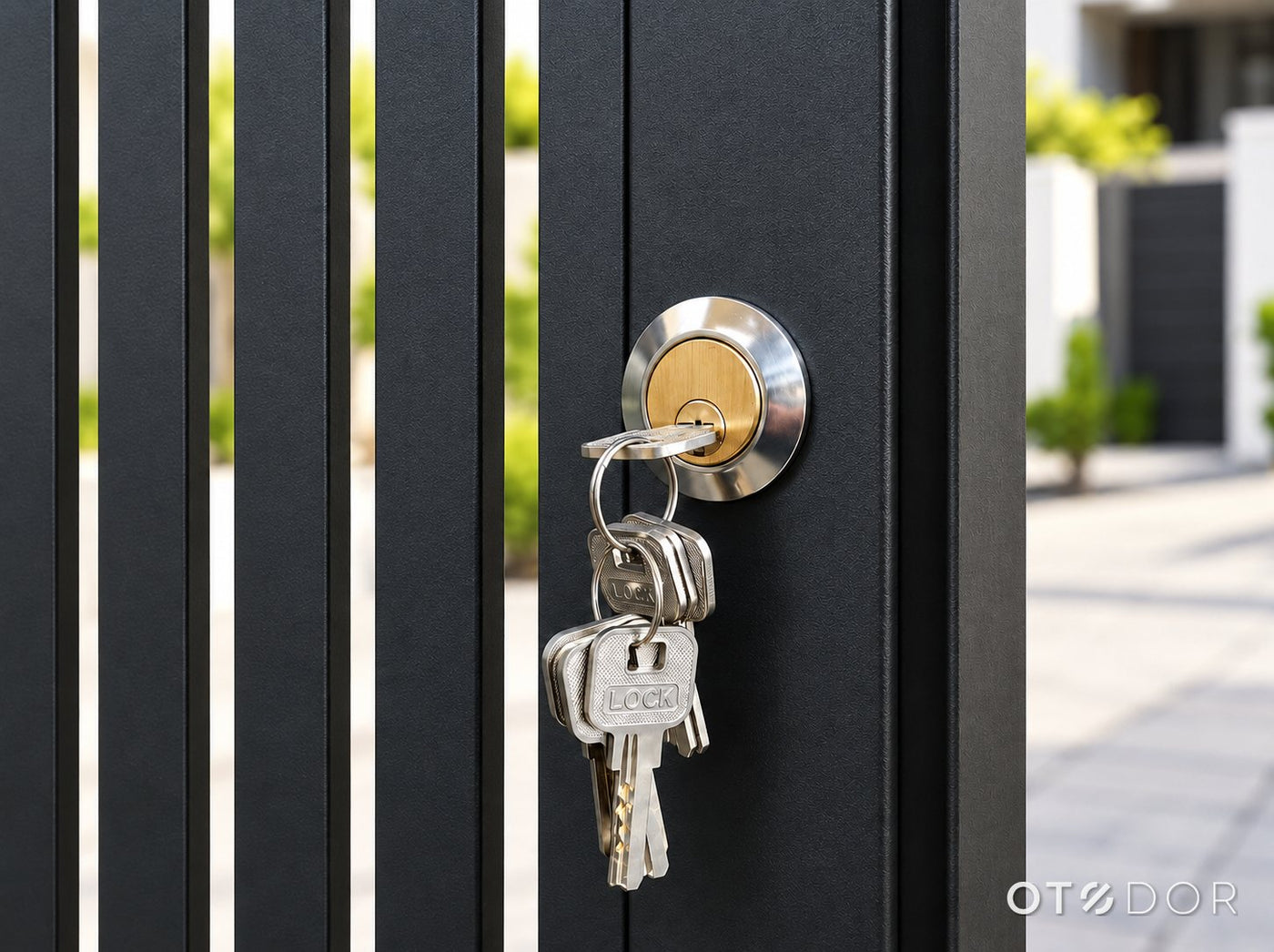
Key backup, always.
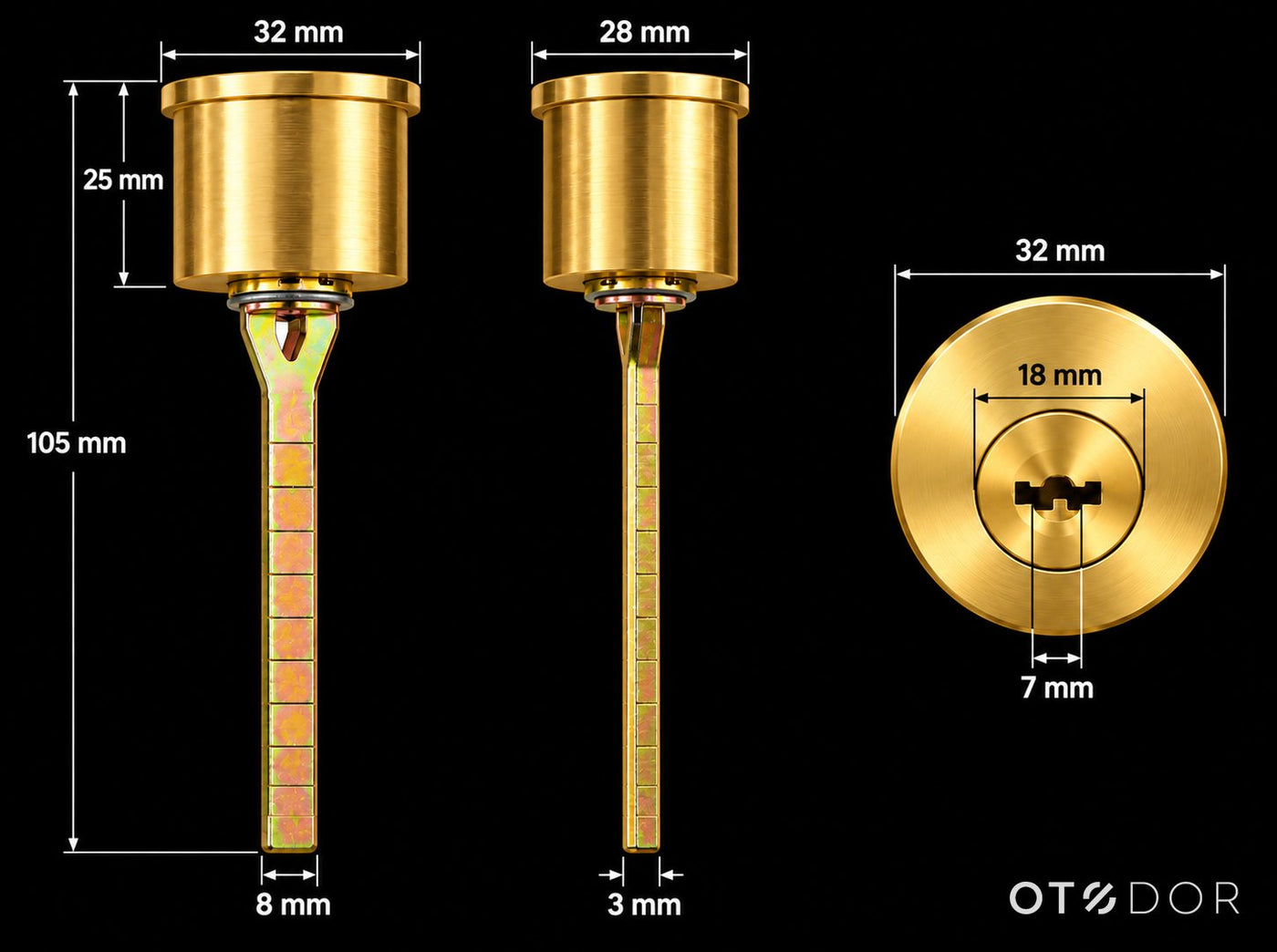
| Flange diameter | 32 mm |
|---|---|
| Cylinder body diameter | 28 mm |
| Cylinder body length | 25 mm |
| Key core diameter | 18 mm |
| Keyway width | 7 mm |
| Overall length with tail | 105 mm |
| Tail (drive bar) | 8 mm wide · 3 mm thick |
| Finish | Brass cylinder, chrome ring |
| Keys | 8 keys supplied |
The cylinder fits through a hole in the gate from outside and the 32 mm chrome ring covers the edge. The tail is cut to suit your gate's thickness during fitting.
Everything to fit it.
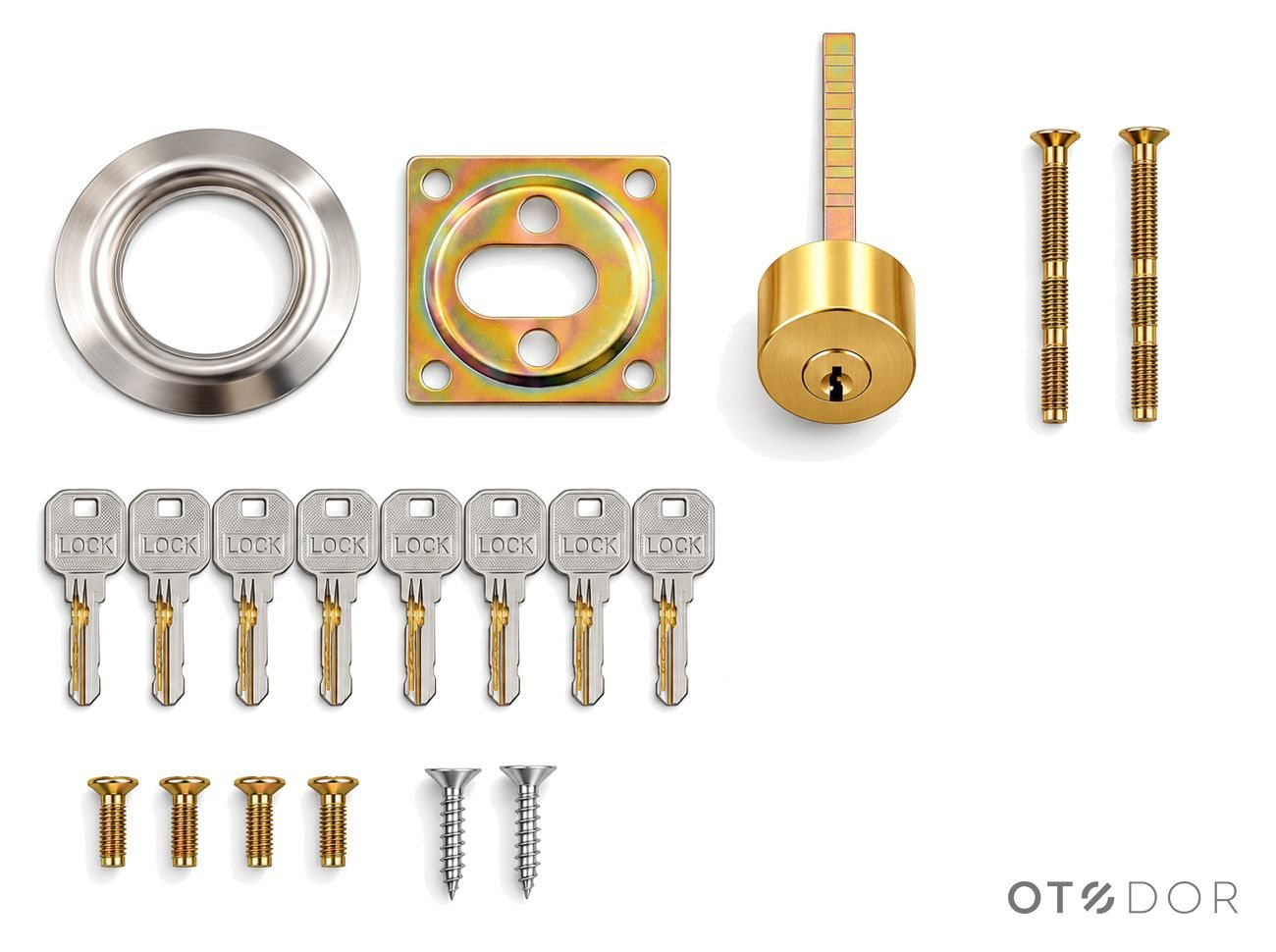
- 1 × CENTRIO electric rim lock with strike
- 1 × Brass key cylinder
- 1 × Chrome cylinder ring
- 1 × Mounting plate
- 8 × Keys
- Fixing screws
- Remote Kit and Smart Wi-Fi Kit also include: the lock supply and 3 remotes
Video door phone, exit switch and cable are not included. Professional installation is available in Delhi NCR, Tricity and Bengaluru.
Open the gate from your car.
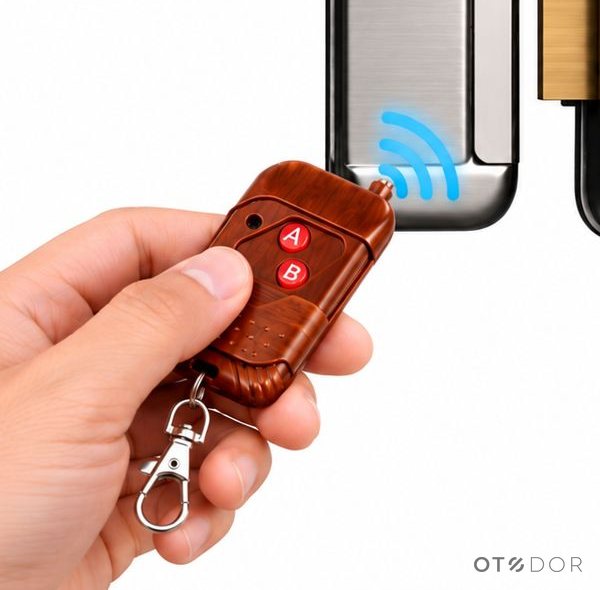
| In the kit | 3 remotes (Remote Kit and Smart Wi-Fi Kit) |
|---|---|
| Frequency | 433 MHz |
| Remotes per supply | Up to 20 on the Wi-Fi Lock Supply |
| Buttons | 2 (A and B) |
| Works without internet | Yes |
Pair a remote
- Press the red ADD button on the supply's terminal board once.
- Press any key on the remote.
- The LED blinks to confirm the remote is paired.
If a remote stops working, pair it again or replace its battery.
The box that powers the lock.
Each kit comes with a lock supply that powers CENTRIO at a safe 12 V DC and listens for the remotes. Both supplies have the same terminal board.
Wi-Fi Lock Supply
| App | Smart Life (Android & iOS) |
|---|---|
| Wi-Fi | 2.4 GHz only (5 GHz not supported) |
| Voice | Alexa and Google Home |
| App members | Up to 15 |
| Remotes | Up to 20 · 433 MHz |
| Lock output | 12 V DC |
| Input | AC 230 V, 50 Hz |
| Mounting | Indoors only |
Remote Lock Supply
| Opens with | Remote, exit switch, door phone |
|---|---|
| App and voice | Not available |
| Remotes | 433 MHz |
| Lock output | 12 V DC |
| Input | AC 230 V, 50 Hz |
| Mounting | Indoors only |
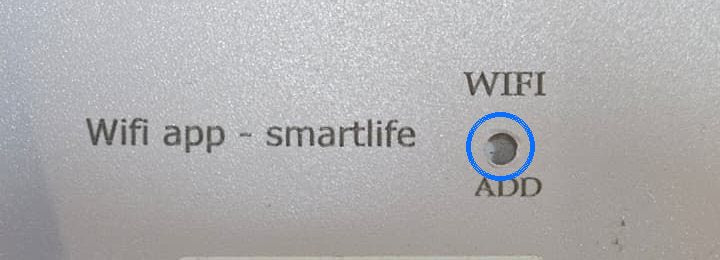
The WIFI button, on the back.
Turn the Wi-Fi Lock Supply over. The small pinhole marked WIFI above and ADD below pairs it with the Smart Life app. Press it with a pen tip when the app asks. The red ADD button on the front is only for remotes.
Six steps to a smarter gate.
Plan the position
Fit the lock on the inside face of the metal gate at a comfortable height. The strike goes on the gate frame, lined up with the latch.
Fit the key cylinder
Drill through the gate for the cylinder. Fit it from outside with the chrome ring, then cut the tail to suit the gate thickness.
Mount the lock
Fix the lock and mounting plate with the screws supplied. Close the gate and check the latch enters the strike smoothly.
Mount the supply indoors
Fix the supply on a dry wall inside the house, away from water, moisture and heat. Never mount it outdoors.
Run the wires
Lock to LOCK. Optional: exit switch (NO) to SW, door phone's door-release output to − VDP + with the right polarity.
Power on and test
Connect to AC 230 V. Test the remote, the exit switch and the app (Wi-Fi Kit). Check the key opens the lock too.
Pair in a few minutes.
You need the Wi-Fi Lock Supply powered on, your phone, and the password of your 2.4 GHz home Wi-Fi.
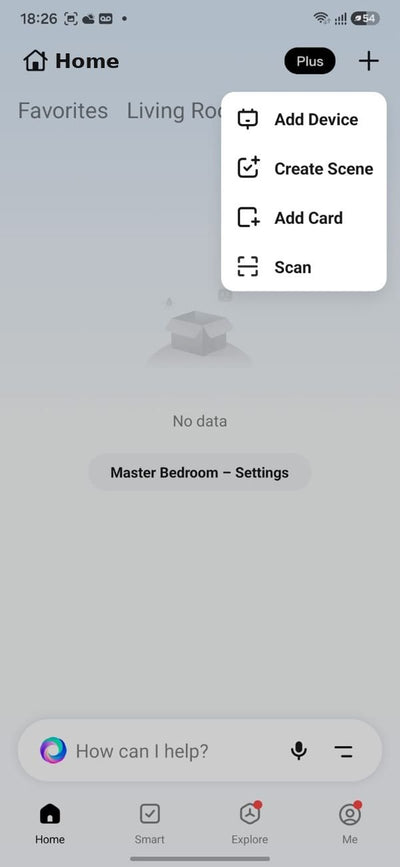
Install Smart Life and tap Add Device
Download Smart Life from Google Play or the App Store, sign up and create a home. On the home screen tap + at the top right, then Add Device.
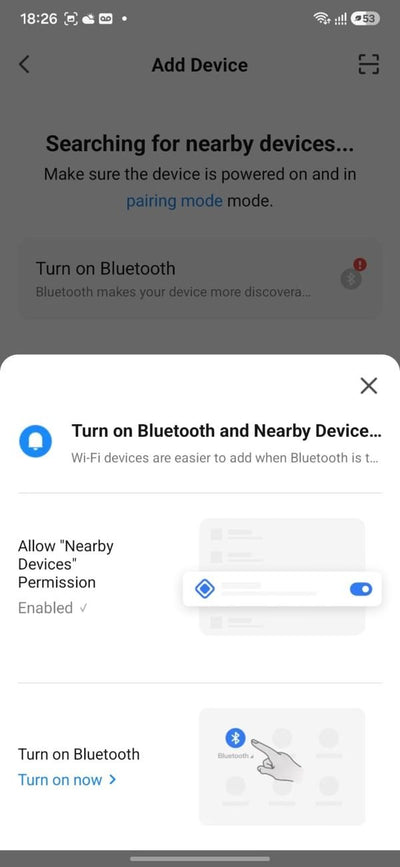
Allow every permission
Allow Bluetooth, Nearby devices and Location, and turn on Bluetooth when asked. This lets the phone find the supply.
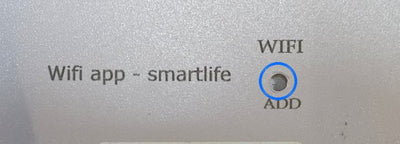
Press the WIFI button on the supply
While the app is searching, press the WIFI pinhole button on the back of the supply with a pen tip. Keep the phone close.
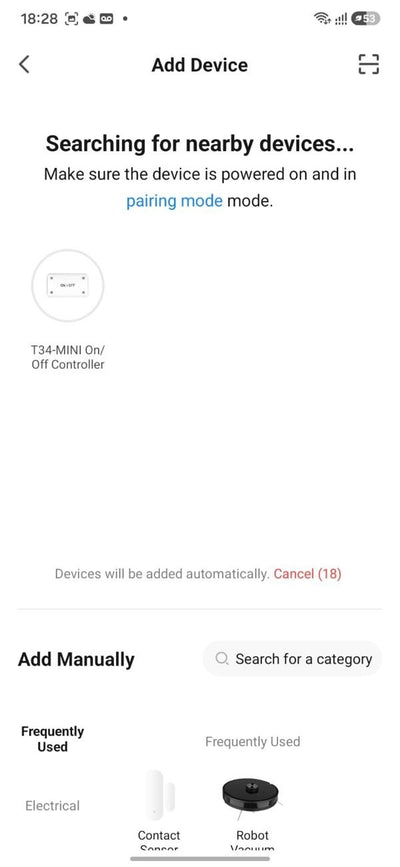
Tap the device that appears
The supply appears as an On/Off Controller. Tap it to add it.
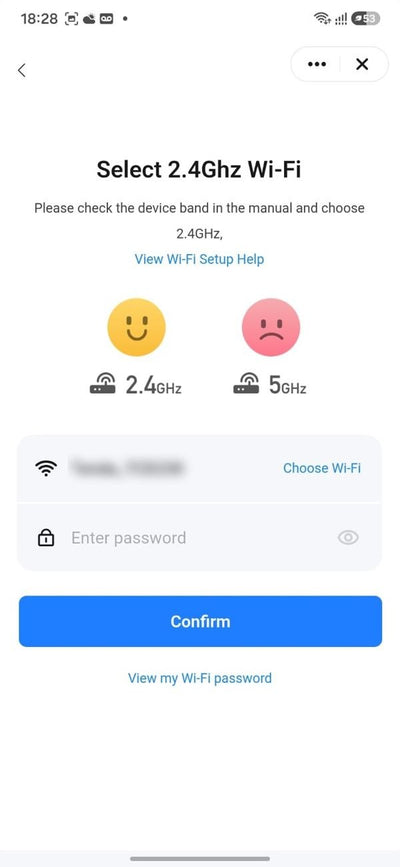
Choose 2.4 GHz Wi-Fi and enter the password
Select your home Wi-Fi, type its password and tap Confirm. The supply does not work on 5 GHz: if your router shows two networks, pick the 2.4 GHz one.
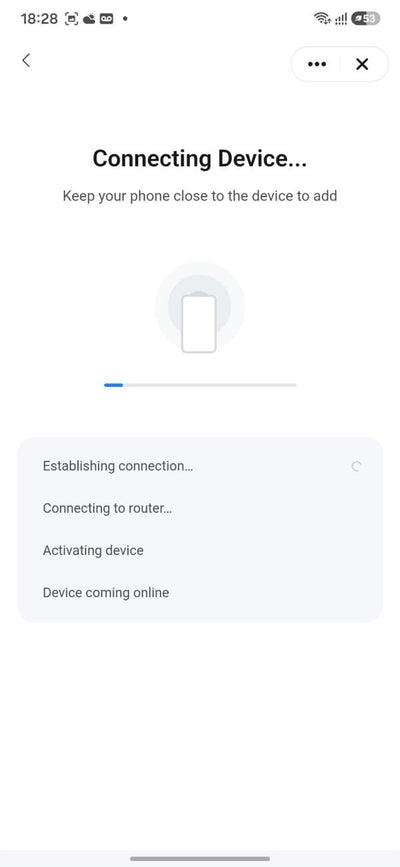
Wait while it pairs
The app connects to the supply, then your router, and brings it online. Keep the phone near the supply.
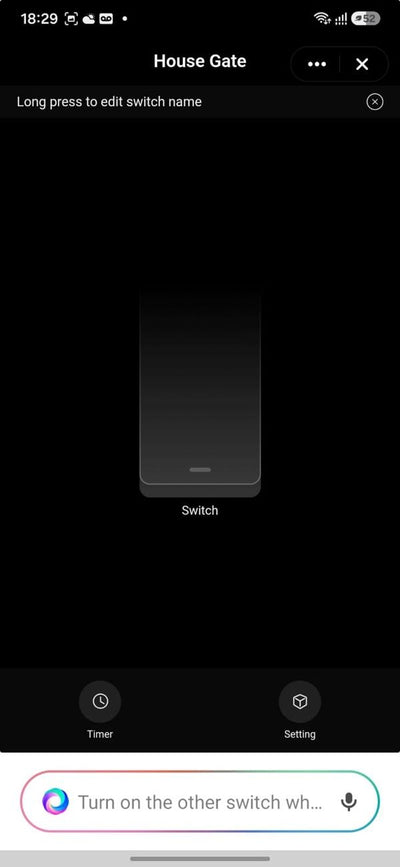
Device paired
Rename it, for example House Gate. Tap the switch to open the gate. Now set Inching to 1 second, below.
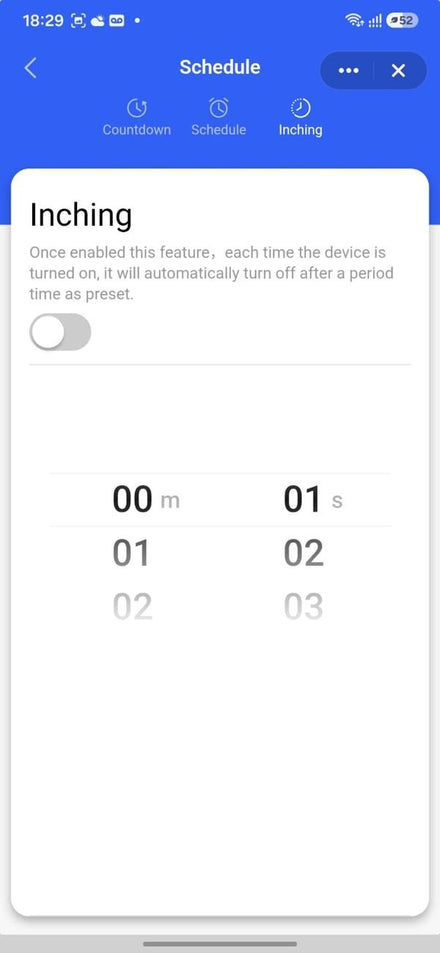
Set Inching to 1 second.
Inching switches the lock off automatically 1 second after it opens. It must always stay on.
- Open the device (House Gate).
- Tap Timer at the bottom.
- Tap Inching at the top right.
- Set the time to 00 m 01 s.
- Make sure the switch is ON (blue).
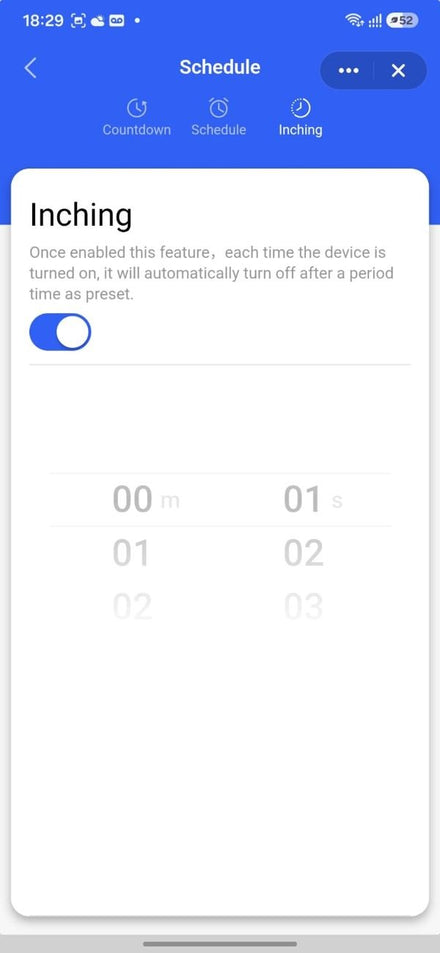
Open from your door phone.
Press unlock on the indoor monitor and the gate opens. Connect at the door phone's outdoor station.
Find the lock terminals
On the back of the outdoor station, find the electric lock output, usually marked LOCK, EL, UNLOCK or − / +.
Run 2 wires to the supply
Use a 2-core wire from those terminals to − VDP + on the CENTRIO supply.
Match the polarity
− to VDP − and + to VDP +. If the gate does not open, swap the two wires.
Test it
Press unlock on the monitor. The gate opens for a moment and locks again when it closes.
Share the gate, not the keys.
Add family members
Up to 15, each on their own phone.
- Each member installs Smart Life and signs up.
- In your app: Me › Home Management › your home.
- Tap Add Member and invite them.
Amazon Alexa
- Open the Alexa app › Skills.
- Enable the Smart Life skill and link your account.
- Discover devices. House Gate appears.
Google Home
- Open Google Home › + › Set up device.
- Choose Works with Google › Smart Life.
- Log in to link your account.
App and voice need working Wi-Fi and internet at the supply. Remotes, exit switch and the key work without internet.
Quick fixes.
| Problem | What to do |
|---|---|
| The app cannot find the device | Turn on Bluetooth and Location and allow all permissions. Press the WIFI button on the back again and keep the phone close to the supply. |
| Pairing fails at "Connecting to router" | Use 2.4 GHz Wi-Fi, not 5 GHz. Re-check the password. Move the router closer or add a Wi-Fi extender near the supply. |
| The device shows offline | Check the supply has power and the router has internet. Restart the router. If you changed the Wi-Fi name or password, pair the supply again. |
| The lock gets hot or buzzes | App › Timer › Inching: make sure it is ON at 1 second. Never leave the lock powered continuously. |
| A remote does not work | Pair it again with the ADD button. Replace the remote battery if its LED is weak. |
| The switch or door phone does not open the gate | Check the wiring on SW and − VDP +. Use a normally-open (NO) exit switch and the door phone's door-release output with correct polarity. |
| Power cut | Open the gate with the key. The lock works again as soon as power returns. |
Made to last.
Look after it
- Keep Inching ON at 1 second at all times.
- Keep the supply indoors, away from water and moisture.
- Do not open the supply cover. High voltage inside.
- Wipe the lock with a dry cloth. No acids or strong cleaners.
- Keep a spare key in a safe place inside the house.
Warranty
- 2 years from the date of purchase, with the bill.
- Not covered: physical damage, water damage, a burnt lock coil, or damage from wrong wiring or Inching turned off.
- Service by OTODOR or a qualified person only.